Mirror selfies have become one of the biggest photography trends on Instagram, Pinterest, and other social media platforms. Whether you’re a fashion creator, influencer, or simply love taking stylish photos, a well-designed mirror selfie can instantly elevate your profile. Thanks to AI image generation, anyone can now create premium-quality mirror selfies without needing an expensive studio.
In this guide, you’ll learn everything about creating aesthetic mirror selfie photos, choosing the perfect background, lighting, poses, and AI prompts that produce realistic results.
Why Mirror Selfies Are So Popular
Mirror selfies combine fashion, lifestyle, and interior aesthetics into a single frame. Unlike regular portraits, they showcase your outfit, surroundings, and personality together.
Reasons why mirror selfies trend:
- Elegant fashion presentation
- Natural body proportions
- Luxury lifestyle appearance
- Perfect for Instagram Reels
- Pinterest-friendly content
- High engagement on social media
- Works for both men and women
Minimalist interiors with warm lighting are especially popular because they create a premium and timeless aesthetic.
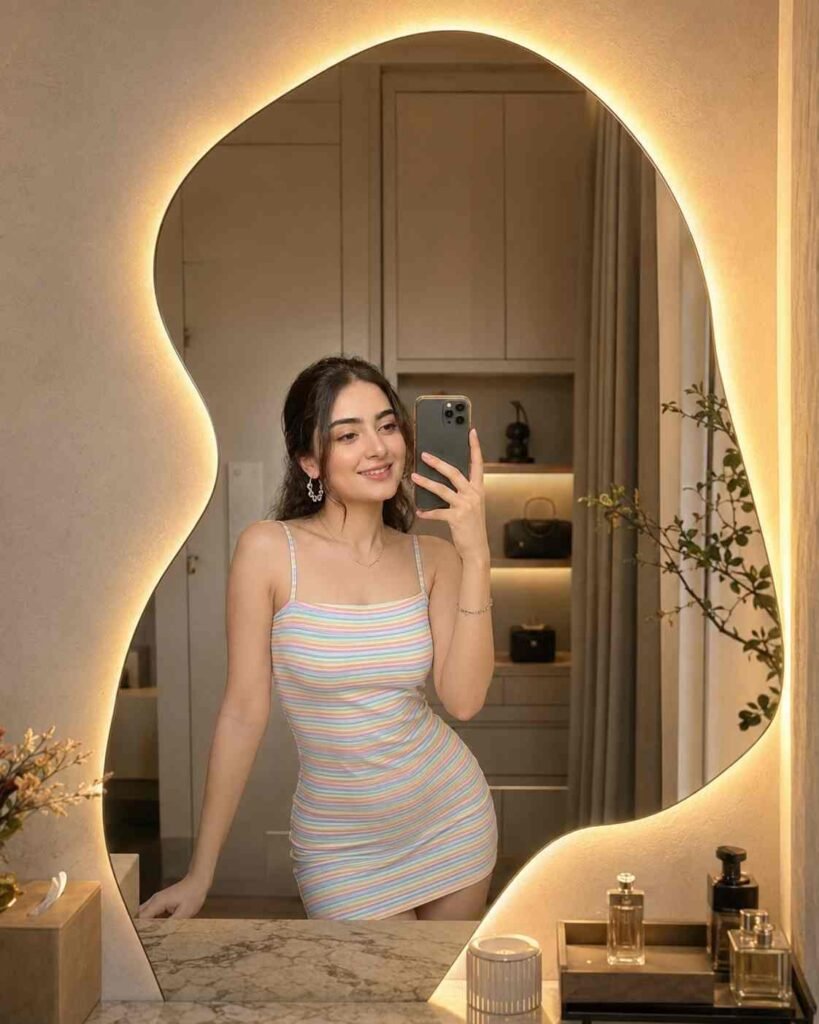
Beautiful young woman taking a mirror selfie in a modern minimalist dressing room. Standing in front of an artistic asymmetrical wavy mirror with warm LED backlighting creating a soft golden glow around the edges. Cozy luxury interior, cream-colored walls, modern cabinetry, decorative plant and bathroom accessories visible. Soft warm lighting, aesthetic fashion photography, high detail embroidery, realistic skin texture, shallow depth of field, ultra-realistic, 4K, cinematic portrait, Instagram fashion influencer style, elegant and sophisticated atmosphere. 4:5 aspect ratioBest Mirror Selfie Setup
A luxury mirror selfie usually includes:
- Large asymmetrical mirror
- Warm LED backlighting
- Neutral cream-colored walls
- Wooden furniture
- Indoor decorative plants
- Luxury perfume bottles
- Modern cabinetry
- Soft ambient lighting
- Minimal decorations
- Clean environment
These elements make every photo look expensive while keeping the focus on the subject.
Perfect Outfit Ideas
Your outfit plays a major role in creating a fashionable mirror selfie.
Popular outfit choices include:
- Summer dresses
- Oversized T-shirts
- Casual jeans with crop tops
- Elegant bodycon dresses
- Hoodies with sneakers
- Minimal monochrome outfits
- Korean fashion
- Streetwear fashion
- Luxury casual wear
Pastel colors often work best because they complement warm indoor lighting.
Lighting Tips
Lighting is the secret behind professional-looking mirror selfies.
For the best results:
- Use warm LED lighting
- Avoid harsh flash
- Choose soft golden illumination
- Keep natural shadows
- Maintain realistic skin tones
- Add slight glow around the mirror
- Keep reflections clean
- Avoid overexposed highlights
Soft lighting creates a premium cinematic appearance without making the image look artificial.
Best Camera Angles
Different mirror selfie angles create different moods.
Popular angles include:
- Straight standing pose
- Slight body angle
- Looking at the phone screen
- Looking into the mirror
- Relaxed smile
- One-hand phone pose
- Full-body mirror selfie
- Half-body portrait
- Sitting mirror selfie
- Fashion pose
Natural expressions always perform better than exaggerated poses.
AI Mirror Selfie Prompt
One of the biggest advantages of AI image generation is that you can create professional-quality photos using only a detailed prompt.
A premium AI mirror selfie prompt should include:
- Identity preservation
- Realistic facial features
- Natural skin texture
- Warm LED lighting
- Luxury dressing room
- Artistic asymmetrical mirror
- Cinematic color grading
- Ultra-realistic photography
- Shallow depth of field
- 4K quality
- High-detail clothing texture
- Soft shadows
- Instagram influencer style
The more detailed your prompt, the more realistic the generated image becomes.
Editing Tips
Even after generating an AI image, small adjustments can make it even better.
Recommended edits:
- Slight contrast increase
- Warm color grading
- Natural skin smoothing
- Sharpen facial details
- Increase dynamic range
- Reduce digital noise
- Maintain realistic colors
- Add subtle vignette
- Enhance mirror reflections
Avoid excessive filters because they reduce realism.
Best Uses for Mirror Selfie Photos
Mirror selfies are suitable for many purposes.
You can use them for:
- Instagram posts
- Instagram Reels covers
- Pinterest Pins
- Fashion blogs
- Portfolio images
- Profile pictures
- Brand promotions
- Clothing advertisements
- Beauty campaigns
- Lifestyle websites
High-quality mirror selfies attract more attention and improve engagement across platforms.
Common Mistakes to Avoid
Many beginners make simple mistakes that reduce image quality.
Avoid:
- Over-editing the face
- Unrealistic body proportions
- Excessive blur
- Overexposed lighting
- Poor mirror reflections
- Messy backgrounds
- Low-resolution images
- Artificial skin texture
- Wrong perspective
- Oversaturated colors
Keeping everything natural creates the most premium-looking result.
SEO Benefits of AI Mirror Selfie Content
If you publish mirror selfie articles on your website, you can target valuable search terms like:
- Mirror selfie ideas
- AI mirror selfie prompt
- Aesthetic mirror selfie
- Instagram mirror selfie
- Luxury mirror selfie
- Dressing room selfie
- AI fashion photography
- Realistic AI portrait
- Mirror photography ideas
- Viral mirror selfie
These keywords can help attract visitors interested in AI-generated photography and fashion content.
Final Thoughts
Mirror selfies continue to dominate social media because they combine fashion, luxury, and personal style in one elegant photograph. With modern AI image generation, it’s now possible to create studio-quality mirror selfies featuring realistic lighting, premium interiors, and cinematic detail without expensive equipment.
Whether you’re a content creator, fashion enthusiast, blogger, or influencer, using detailed AI prompts along with thoughtful editing can help you produce eye-catching images that stand out on Instagram, Pinterest, and beyond. Focus on natural expressions, warm lighting, clean compositions, and realistic textures to achieve the best results.
As AI technology evolves in 2026, creating professional-quality mirror selfie photography has become easier than ever. Experiment with different poses, interiors, and lighting styles to develop a unique aesthetic that reflects your personal brand.