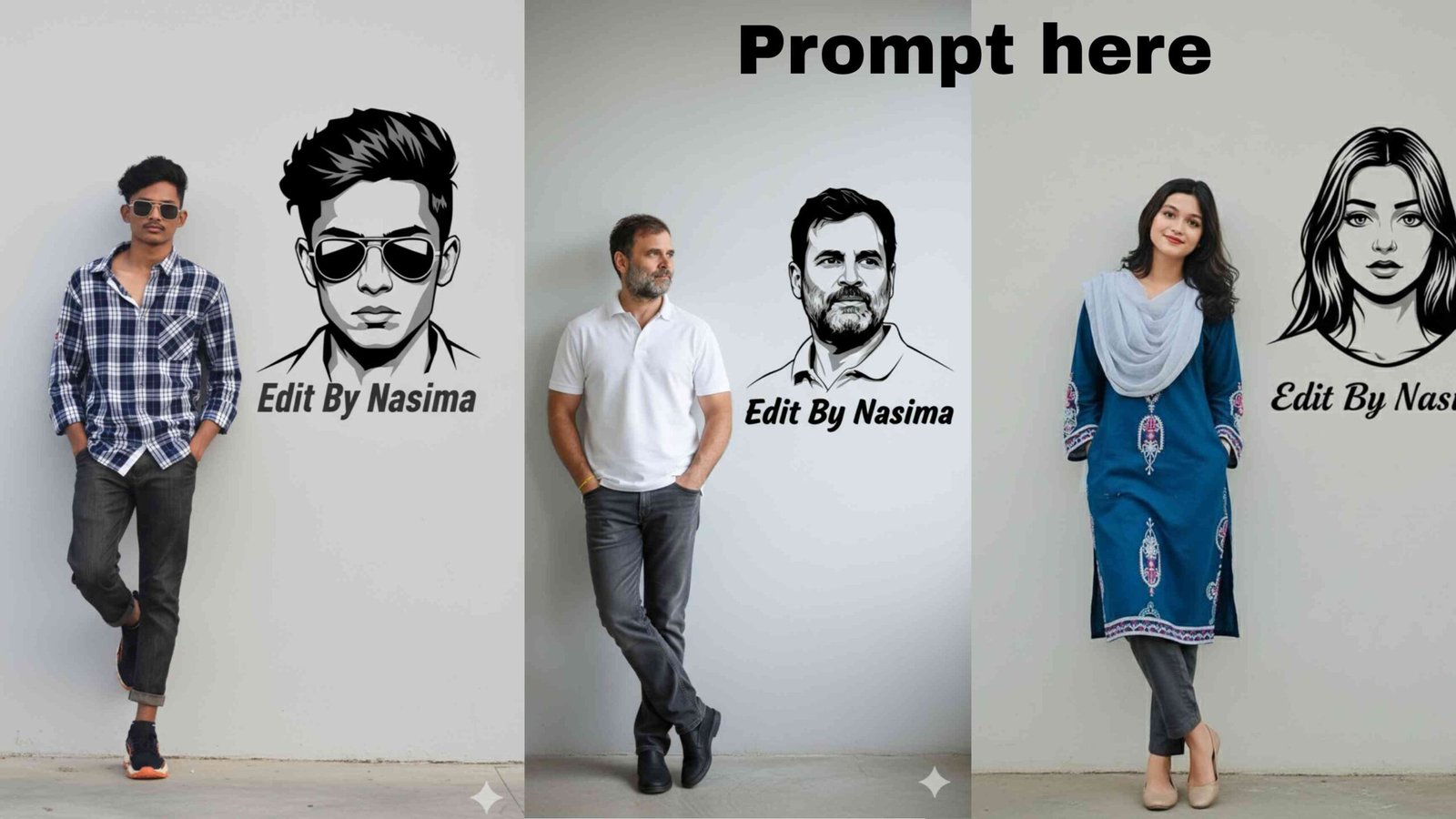
In the rapidly evolving landscape of digital art and content creation, a new form of creativity is taking hold. It’s an art form that requires no brush, no camera, and no complex software—only the power of a text prompt. At the heart of this revolution is Gemini AI photo editing, a groundbreaking capability that is democratizing advanced photo manipulation for everyone. By using natural language, users can transform their ordinary photos into stunning, professional-quality works of art that were once the domain of skilled designers.
This article will serve as your ultimate guide to mastering Gemini AI photo editing with prompt. We will deconstruct the technology, explain the key principles of effective prompting, and provide a wealth of examples and templates to help you unlock the full creative potential of this incredible tool. Whether you’re a content creator looking to generate viral content or a photography enthusiast wanting to explore new styles, this is the future of visual expression.
What Makes Gemini AI Photo Editing So Powerful?
Gemini AI photo editing is powered by Google’s latest advancements in multimodal AI, capable of understanding and generating content across various formats, including images and text. The technology is often referred to by its development name, “Nano Banana,” and is integrated into the Gemini app and Google AI Studio. What sets it apart from other AI image generators is its remarkable ability to perform highly specific, intricate edits on existing photos while maintaining subject consistency and a high degree of realism.
The core features that define this groundbreaking technology include:
- Seamless Subject Consistency: One of the most significant challenges in AI image editing has been maintaining the likeness of a person or object across different edits. Gemini excels at this. You can upload a photo of yourself and place your likeness into a different environment, costume, or time period, and the AI will preserve your facial features and unique characteristics with remarkable accuracy.
- Targeted Transformations: You can instruct the AI to make precise, localized changes with a simple prompt. Want to change the color of a person’s shirt? Remove a distracting object from the background? Or add a new element to a scene? Gemini can handle these requests with surgical precision, making it an incredibly powerful tool for editing.
- Creative Compositing: Gemini can intelligently merge two or more images into a single, cohesive scene. For example, you can upload a photo of yourself and a photo of a famous landmark and prompt the AI to place you in front of it, ensuring the lighting, shadows, and perspective are all realistically blended.
- World Knowledge Integration: The AI leverages Gemini’s vast world knowledge to understand and create contextually accurate images. You can ask it to place you in a specific time period, style, or genre, and the AI will draw from its knowledge base to generate authentic and detailed visuals.
The Anatomy of an Effective Prompt
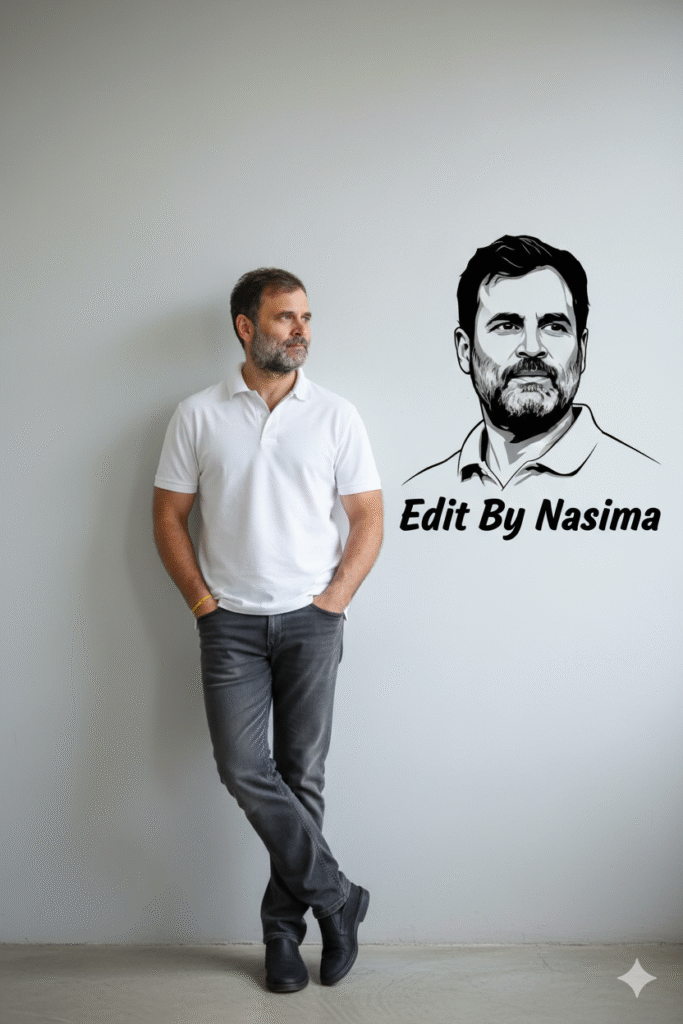
1/2 Photo-realistic 8K full-body portrait of this gaming character, I'm the above image leaning casually against a clean light-grey wall. outfit still same with attached image .Hands in pockets, one leg crossed over the other, relaxed, confident pose. On the wall next to him, create a bold black-and-white stylised vector portrait of the same character with modern geometric elements And write the name in bold stylish font under the stylish vector portrait "Your Text"The success of your Gemini AI photo editing with prompt lies entirely in the quality of your instructions. A well-crafted prompt acts as a blueprint for the AI, guiding it to create exactly what you envision. A powerful prompt typically includes a combination of descriptive elements:
- Subject: Clearly define the main subject. Be specific about their appearance, clothing, and expression.
- Action/Command: State exactly what you want the AI to do. Use strong verbs like “transform,” “apply,” “reimagine,” or “place.”
- Environment/Setting: Describe the scene, location, and time of day. Use evocative words to paint a picture.
- Style and Aesthetic: This is where you can add artistic direction. Specify a style like “cinematic,” “photorealistic,” “vintage,” “anime,” “watercolor,” or “3D rendering.” You can also include technical photography terms like “shallow depth of field,” “golden hour lighting,” or “wide-angle lens.”
- Technical Specifications: For an even higher level of control, you can add details about the camera, lighting, and resolution, such as “8K UHD,” “shot on a Nikon Z9,” or “with soft diffused light.”
Practical Prompt Examples for Every Creative Need
To get started with Gemini AI photo editing with prompt, here are some SEO-optimized examples covering a wide range of creative applications that are currently trending.
For a Cinematic Look:
- Prompt: “Transform this photo into a cinematic still from a sci-fi film. The subject is standing on a deserted street, with neon lights reflecting off the wet pavement. Add a subtle lens flare and a misty, futuristic atmosphere. Use a moody color grade with deep blues and warm oranges. Photorealistic, 8K UHD.”
For a Realistic 3D Figurine:
- Prompt: “Using the Nano Banana model, create a 1/7 scale commercialized figurine of the person in the picture, in a realistic style. The figurine is placed on a computer desk with a transparent acrylic base. On the computer screen, show a 3D modeling process of this figurine. Add a toy packaging box next to the monitor, printed with the original photo on it. Professional studio lighting.”
For Historical and Fantasy Transformations:
- Prompt: “Reimagine this photo as a high-end vintage portrait from the 1920s. The subject is dressed as a flapper, with a beaded dress and a feathered headband. The background is a dimly lit, smoky jazz club. Add a grainy, sepia-toned filter for a classic look. Realistic.”
- Prompt: “Turn this portrait into a magical fantasy illustration. The subject is an elven warrior with glowing eyes, wearing ornate leather armor and holding a mystical staff. Place them in a lush, enchanted forest with bioluminescent mushrooms and glowing fireflies. The style is a hyper-realistic digital painting.”
For Couple and Family Photos:
- Prompt: “Transform this couple’s photo into a romantic, dreamy scene. They are embracing on a balcony overlooking the Paris skyline at sunset. The lighting is soft and warm, with a subtle bokeh effect on the background lights. Cinematic, sentimental, and romantic.”
The Future of Prompts and Visual Creation
The current capabilities of Gemini AI photo editing with prompt are just the beginning. As the technology evolves, we can anticipate even more sophisticated and intuitive features. We may soon be able to perform complex video edits with simple prompts, create animated scenes from static photos, and seamlessly blend live video with AI-generated content in real-time. The ability to articulate your creative vision in a text prompt will become a core skill for the next generation of digital creators.
In conclusion, Gemini AI photo editing with prompt is not just a trend—it’s a fundamental shift in how we create and manipulate images. It empowers anyone with an idea to bring it to life, transforming a passive experience into an active, creative one. By mastering the art of the prompt, you are not just using a tool; you are directing your own creative universe, one command at a time.